HIDway+
Use your keyboard and mouse on another PC over the network. A Raspberry Pi Pico plugged into that PC acts as a real USB keyboard and mouse, so nothing is installed on it.
Download
The download needs JavaScript, which loads the current release from this site. If no download button appears here, allow JavaScript for this site or reload the page.
Extract the whole ZIP and run HIDway-Setup.exe. Checksums and how to verify
How it works
Three parts carry your input from the PC you sit at to the PC you control. The target only ever sees a USB keyboard and mouse.
-
Windows app
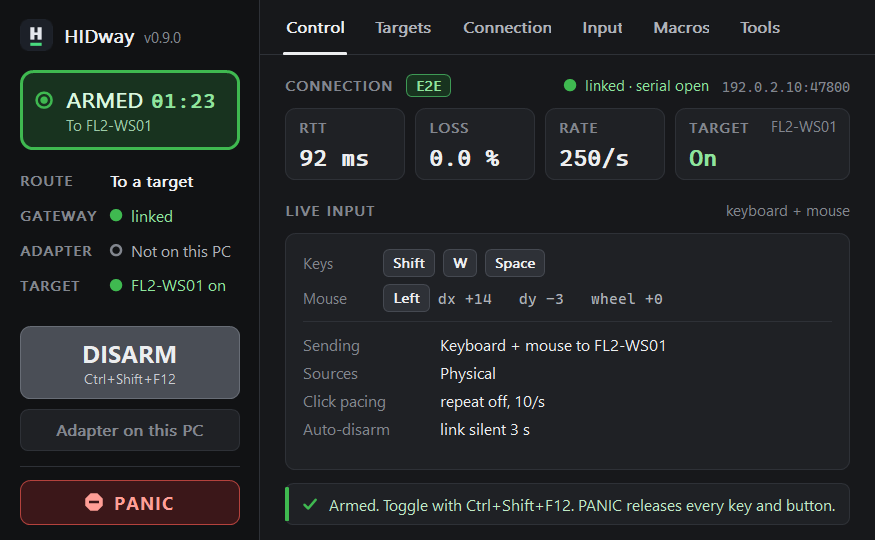
Runs on the PC you sit at. While ARMED it captures your keyboard and mouse and sends them over your private network.
-
Relay on a Raspberry Pi
A small service receives the input and passes it on to the Pico over a serial link. When the input stops arriving, it releases every key.
-
Pico on the target
Plugged into a USB port of the target PC, it is that PC's keyboard and mouse. No driver and no software on the target.
- Keyboard and mouse only. Picture and sound come from a separate application, such as Moonlight with Sunshine, or AnyDesk.
- Fail-safe. A lost link, a timeout or a crash ends with all keys and buttons released, so a key cannot stay stuck on the target.
- Honest identity. The Pico shows up as a plain USB keyboard and mouse under its own name. It does not imitate another vendor.
- Nothing happens by itself. No automatic ARM, no automatic install, no telemetry. PANIC releases everything at once.
What you need
- A Windows PC to control from. HIDway runs here.
- A Raspberry Pi for the relay, with Raspberry Pi OS, SSH and internet access while it installs.
- A Raspberry Pi Pico, Pico W, Pico 2 or Pico 2 W for the target PC.
- A USB cable from the Pico to the target PC.
- A serial link from the Pi to the Pico: three wires from a Pi 4's GPIO header to the Pico's GP1, GP0 and GND, or a Raspberry Pi Debug Probe on a USB port of the Pi.
- A private network that both the Windows PC and the Pi are on, such as your local network.
Get started
- Download and extract. Extract the whole ZIP to a normal local folder such as
C:\HIDway. Cloud-synced folders like OneDrive are refused. - Run the setup wizard.
HIDway-Setup.exeinstalls HIDway and the Input Monitor. It needs no administrator rights. The programs are not signed yet, so Windows may show its publisher prompt. - Set up the relay. Enter the Pi's address and the wizard installs the relay over SSH in a visible terminal, where you check the host key and type your password yourself.
- Flash the Pico and arm. Hold BOOTSEL while connecting the Pico's USB, choose the board and let the wizard copy the firmware. Then open HIDway, add your target on the Targets tab and press ARM.
ARM and disarm with the button or Ctrl+Shift+F12. PANIC, Ctrl+Alt+Shift+End, releases everything.
Firmware for the Pico
The Windows download already contains all four files, and the setup wizard copies the right one. Download one here only to flash a Pico by hand: hold BOOTSEL while connecting its USB, then copy the file to the drive that appears. Read the board label first; the drive cannot reliably tell a W board from one without.
The firmware carries the same version number as the app. A Pico needs flashing again only when a release says so.
The firmware downloads need JavaScript, like the Windows download.
Verify your download
Every file has a SHA-256 checksum. Compare it with the one shown here before you run the file. The firmware checksums are on the firmware cards above.
The checksums need JavaScript, like the downloads.
HIDway for Windows
In PowerShell, in the folder with the download, run Get-FileHash .\HIDway-windows.zip -Algorithm SHA256 and compare the hash it prints with the one above. PowerShell shows it in capitals; the letters are the same.
All checksums of this release in one file: SHA256SUMS.txt.
Updates
When HIDway opens, it checks this site for a new version and downloads it in the background. Each download is verified before it is installed, and nothing is installed until you press Update now. The previous version is kept, so you can roll back.